
Register an app
Login with xChk is not enabled on this server.
Add /oauth/playground.html to test grants without deploying a callback.
New apps start unverified — users see a warning on the consent screen until your app is verified (domain proof, business verification). Contact support to verify.
Endpoints for your app:
Your apps
Loading...
OIDC endpoints
/.well-known/openid-configuration/oauth/authorize/oauth/token/oauth/jwks/oauth/userinfoPublic clients must use PKCE (S256). Exchange codes on your server, not in the browser.
API & Webhooks
×Helpdesk / HR
Enrollment invitations from your ATS or helpdesk, and the systems that sync candidates and tickets: Zendesk, Greenhouse, Ashby and LinkedIn have their own tabs above.
Invite enrollments from external systems with an API key. Optional webhook receives batch results.
API keys
Named keys help audit which integration called the API.
Copy this key now — it will not be shown again:
External endpoint: POST /api/v1/preregister/invites with header X-API-Key and body { "emails": ["a@x.com"] }
Test webhook sink: https://in.xchk.io/api/webhooks/test (logged on server)
Company SSO — Login with Microsoft Entra
Your team signs in with the Continue with Microsoft button on the sign-in page — any Microsoft Entra work or school account, with no setup and no separate xChk password. Those sign-ins are linked to your organization's tenant automatically.
Recruiter SSO & signed launch (LinkedIn)
Separate from company sign-in above. Connect LinkedIn to verify the recruiter,
then launch helpdesk from candidates.html or your ATS with a signed
link. Steps 1–3 are this one flow.
1. LinkedIn
2. Enable signed launch
3. Mint launch URL
Server endpoint (requires integrator API key and SSO enabled):
POST /api/integrator/sso/mint-launch with header X-API-Key
Body: { "email": "candidate@example.com", "mobile": "+15551234567", "candidateId": "...", "linkedinId": "username", "operatorEmail": "recruiter@company.com", "operatorName": "Jane Recruiter" }
Returns a signed launchUrl (15 min TTL) that opens helpdesk with subject context pre-filled.
Connect Zendesk for PASS/FAIL ticket sync and install the sidebar app for agents.
1. Connect Zendesk subdomain
2. Download xChk app
Download zendesk-xchk-app.zip3. Upload App
Upload in Zendesk Admin4. Add integrator token ?
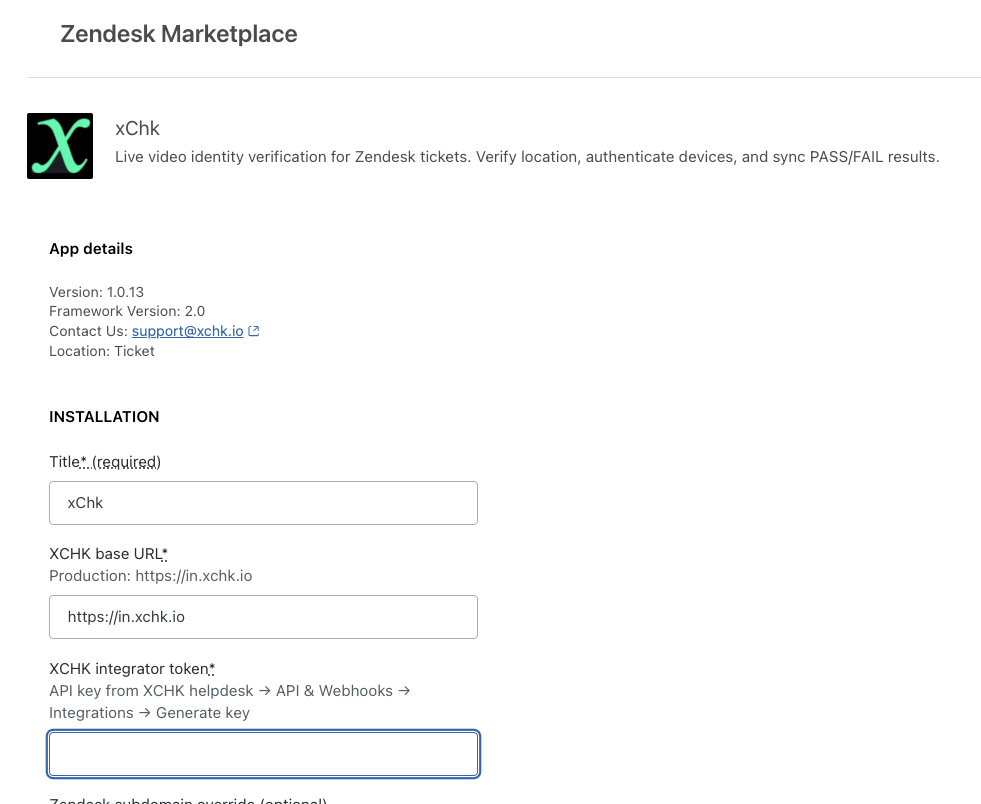
API key for Zendesk to access xChk — set this in xchk_integrator_token in the Zendesk app settings. Keys are named zd-subdomain-1, etc.
Copy this key now — it will not be shown again:
Create API keys for AI agents and automation to request human attestations. Each key has its own webhook URL where results are sent.
Create an API key
Copy this key now — it will not be shown again:
Existing keys
Each key sends results to its own webhook URL. Click a key to edit its webhook.
API reference
Send an attestation request using an API key:
curl -s -X POST "https://in.xchk.io/api/attestations" -H "X-API-Key: your_key_here" -H "Content-Type: application/json" -d '{"user":"user@company.com","prompt":"Approve $5,000 payment to Vendor X","type":"t/f","ttl":3600}'
ttl is seconds until expiration (default 600, max 86400).
On response, results are POSTed to the key's webhook URL with payload: { event, attestation_id, target_email, prompt, response, ... } — signed with the key's webhook secret.
Since 18 Oct 2026 the signed webhook sink (Integrations → AI) is this callback's successor: one endpoint receives every finding — refusals, holds, approvals and denials with their receipts, gate drops, omissions, revocations — as signed CloudEvents, with a delivery log and retries. This per-key callback keeps working for the keys that have one.
Results are also POSTed to the key's webhook URL. Configure Slack or Telegram under Profile → About me.
Then, in Ashby (two things xChk cannot do for you):
1. Custom Fields → Candidate → xChk interview link and xChk verification link → tick Enable in Email Templates.
2. Scheduling Defaults → Communication → add the tokens with the editor's T button: [Custom field] xChk interview link in the Invite to Interviewers template, [Custom field] xChk verification link in the Invite to Candidate template.
Invites go out through the scheduler's connected calendar — "Pending invites" on a schedule means Ashby has not sent them. Preview shows N/A instead of the link? Press Sync now and reload the scheduling page.
Full setup guide →
Connectors: where a finding goes
Every finding the registry makes about a plate — an act refused or held, an approval or denial with its receipt, a gate dropped, the coverage lamp going red, a plate revoked — is pushed to each sink below, with the record hash and the receipt URL so the SIEM holds pointers into evidence. Three retries over about twenty minutes; every attempt is in the delivery log. The per-key attestation webhook on the Attestations tab is this signed webhook's predecessor: it answers one API key's requests; a sink here receives every finding. How each sink is set up.
Sinks
Loading…New sink
Delivery log
| When | Finding | Sink | Status | Attempts | Response |
|---|
https://xchk.io/secevent/decision, with the record hash, previous hash, attestation hash, approver and auth method). An emergency stop is a CAEP session-revoked per plate; a plate revoked or re-issued is a CAEP credential-change. The subject is the plate; the person rides inside the event.
Receivers verify tokens against
POST /api/ssf/poll with the bearer shown once at creation (RFC 8936; ack with {"ack":["jti"]}).
OCSF export: any plate's window as OCSF 1.3 NDJSON (API Activity per record, Detection Finding per stop):
GET /api/agents/<id>/ocsf?from=&to= — beside the OTel export on the plate sheet.